Experience Australia's premier sugar dating platform on your mobile device. Discreet, secure, and designed for genuine connections.

The SugarDaddyMeet app brings Australia's most trusted sugar dating platform to your fingertips. Whether you're a successful sugar daddy or an ambitious sugar baby, our mobile app offers unmatched convenience, privacy, and features designed specifically for the Australian sugar dating community.
With over 100,000 active Australian members, the app provides instant access to verified profiles, secure messaging, and exclusive features that make finding your ideal match easier than ever. The discreet app icon and privacy controls ensure your sugar dating remains completely confidential.
Available for both iOS and Android devices, the SugarDaddyMeet app transforms how Australians connect for meaningful relationships. Experience swipe-style matching, instant notifications, location-based search, and premium features that put genuine connections at your fingertips.
Powerful tools designed for successful sugar dating in Australia
The app displays a neutral icon on your phone that doesn't reveal its purpose. Your privacy is protected from curious eyes—family, friends, or colleagues won't know what app you're using.
Browse profiles with intuitive swipe gestures. Swipe right on profiles you like, left on those you don't. When both parties swipe right, it's an instant match and you can start chatting immediately.
End-to-end encrypted messaging keeps your conversations completely private. Send text messages, photos, and voice notes instantly. Real-time notifications ensure you never miss important messages from potential matches.
Traveling across Australia? Switch your location to Sydney, Melbourne, Brisbane, Perth, or any Australian city instantly. Perfect for FIFO workers, frequent travelers, and those planning trips to different cities.
Customize notification settings for complete privacy control. Choose which alerts you receive, when you receive them, and how they appear. Silent mode available for maximum discretion during work hours or family time.
In-app photo verification ensures you're connecting with real people. Verified badges appear on authentic profiles, giving you confidence that matches are genuine. Upload verification photos directly through the app in seconds.
Filter potential matches by age, location, income level, education, body type, lifestyle preferences, and relationship expectations. Save your favorite search criteria for quick access. Find exactly what you're looking for efficiently.
Connect face-to-face through secure in-app video calls before meeting in person. Verify authenticity, build comfort, and establish chemistry from the safety of your home. Video chat is encrypted and never recorded.
Create private photo albums visible only to members you grant access. Control who sees your exclusive photos. Request access to other members' private albums. Perfect for maintaining privacy while sharing more personal content with trusted connections.
See when members were last active on the app. Focus your attention on active users who are currently looking for connections. Filter search results to show only members active within the last 24 hours, week, or month.
Save favorite profiles for quick access later. Block users you're not interested in—they won't appear in your searches again. Manage your favorites list and blocked users easily from app settings.
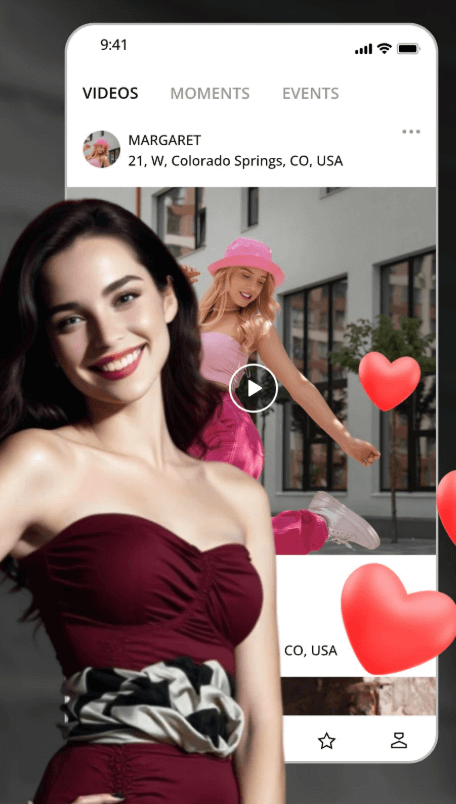
Create and edit your profile entirely from your mobile device. Upload photos directly from your camera or gallery, write compelling bios, specify your preferences, and update information anytime. The app's intuitive interface makes profile creation quick and easy, even for first-time users.
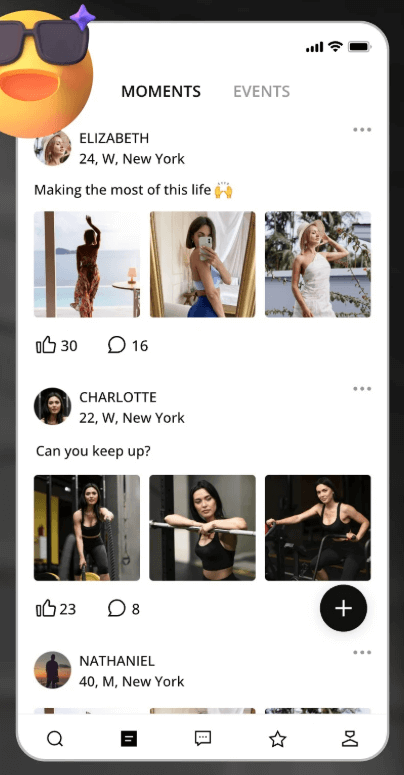
Share temporary moments that disappear after 24 hours, similar to Instagram Stories. Post photos from your day, share experiences, or give potential matches a glimpse into your lifestyle. Moments create engagement and help you stand out from other profiles.
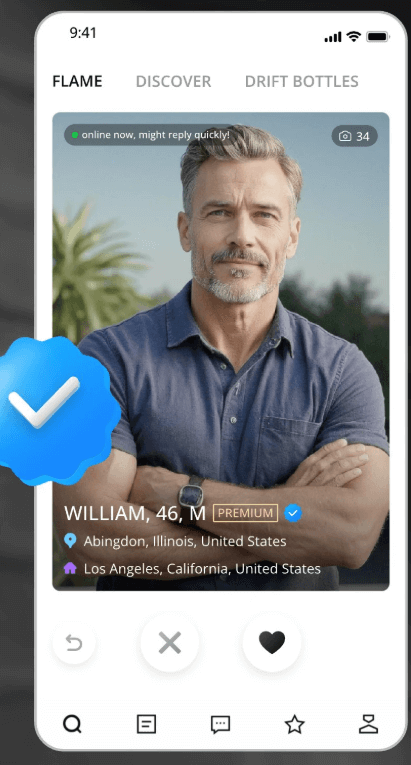
Complete photo verification directly through the app in under 2 minutes. The system uses facial recognition to match your selfie with profile photos, ensuring authenticity. Verified members receive a badge that significantly increases match rates and trust.

New users receive guided onboarding that explains app features, safety tips, and best practices for sugar dating success. The tutorial ensures you understand how to maximize the platform and stay safe while connecting with potential matches.
Download the app from our website (iOS or Android). Follow the installation instructions specific to your device. The app is free to download and takes less than 2 minutes to install.
Sign up with your email address and create a secure password. Upload at least 3 high-quality photos showing your face clearly. Write an engaging bio that highlights your personality, interests, and what you're looking for in a sugar relationship.
Complete photo verification to receive your verified badge. This significantly increases your visibility and match rate. Verification takes under 2 minutes and involves taking a selfie that matches your profile photos.
Use swipe-style matching or advanced search filters to find potential matches. Send messages to members you're interested in. Upgrade to premium for unlimited messaging and access to exclusive features.
Chat with matches through secure messaging. Share photos, voice notes, or connect via video chat. Discuss expectations openly and honestly. When comfortable, plan your first meeting in a public place.
Meet your match in person at a agreed location. Always prioritize safety by meeting in public first. If the connection is genuine, establish your relationship terms and enjoy your sugar dating experience.
Unlock exclusive features that accelerate your sugar dating success
| Feature | Free Membership | Premium Membership |
|---|---|---|
| Profile Creation | ✓ Unlimited | ✓ Unlimited |
| Photo Uploads | Up to 5 photos | ✓ Unlimited photos |
| Browse Profiles | ✓ Unlimited | ✓ Unlimited |
| Send Messages | Limited (5 per day) | ✓ Unlimited messaging |
| Read Messages | ✓ All messages | ✓ All messages |
| Video Chat | ✗ Not available | ✓ Unlimited video calls |
| Private Photo Access | Request only | ✓ Automatic access requests |
| Advanced Search Filters | Basic filters only | ✓ All premium filters |
| Profile Visibility | Standard | ✓ 3x higher visibility |
| See Who Viewed You | Last 5 viewers | ✓ Unlimited viewer history |
| See Who Liked You | ✗ Not available | ✓ Full list of likes |
| Incognito Mode | ✗ Not available | ✓ Browse anonymously |
| Priority Support | Standard response time | ✓ 24-hour priority support |
| Ad-Free Experience | ✗ Contains ads | ✓ Completely ad-free |
| Monthly Cost | Free | From $49.99 AUD/month |
*All prices in Australian Dollars. Premium membership auto-renews unless cancelled. Cancel anytime from app settings.
Visit www.sugardaddymeets.au on your iPhone or iPad using Safari browser. If you're a new user, click "Join Free" to create your account. If you already have an account, click "Sign In" and enter your credentials. Complete your profile with photos and information.
Once signed in, tap the Share icon at the bottom of your Safari browser (it looks like a square with an arrow pointing upward). This will open the iOS share menu with various options for sharing and saving content.
Scroll down in the share menu and tap "Add to Home Screen". You'll see a preview of the app icon and name. You can customize the name if desired, though we recommend keeping the default discreet name for privacy.
Tap "Add" in the top-right corner to confirm. The SugarDaddyMeet app icon will now appear on your home screen. Tap the icon anytime to access the app instantly. The app works like a native iOS application with full functionality.
Note: The iOS version is a Progressive Web App (PWA) that provides native app experience without App Store download. It's completely secure, updates automatically, and takes up minimal storage space on your device.
Open www.sugardaddymeets.au on your Android device using Chrome browser. New users should click "Join Free" to register. Existing members click "Sign In" and enter your login details. Make sure your profile is complete with photos and preferences.
After signing in, tap your Profile icon in the top-right corner of the screen. This will open your profile menu with various account options and settings. Look for the app installation option in this menu.
In the profile menu, tap "Install Our App Now". This will take you to the app download page specifically designed for Android devices. You'll see information about the app and download options.
Click "Download APK" to download the Android app file. Your browser may ask for permission to download files—tap "Allow". Once downloaded, open the APK file and follow the installation prompts. You may need to enable "Install from Unknown Sources" in your Android settings. After installation, the app icon appears on your home screen.
Note: The Android APK is safe and secure, digitally signed by SugarDaddyMeet. It's not available on Google Play Store to maintain discretion. The APK updates automatically when you open the app, ensuring you always have the latest features and security patches.
| Feature | Mobile App | Website |
|---|---|---|
| Convenience | ✓ Instant access from home screen | Requires browser login |
| Notifications | ✓ Real-time push notifications | Email notifications only |
| Swipe Matching | ✓ Intuitive swipe gestures | Click-based matching |
| Photo Upload | ✓ Direct from camera/gallery | Requires file selection |
| Location Services | ✓ Automatic location detection | Manual location entry |
| Video Chat | ✓ Optimized for mobile | △ Available but less convenient |
| Offline Access | ✓ View cached profiles | ✗ Requires internet |
| Privacy | ✓ Discreet icon, app lock | Browser history visible |
| Speed | ✓ Faster loading times | Standard web speed |
| Moments/Stories | ✓ Full functionality | ✗ Not available |
| Best For | Daily use, on-the-go matching | Detailed profile browsing |
Recommendation: Use the mobile app for daily browsing and messaging, and the website for detailed profile creation and extensive searching. Both platforms sync automatically, so your data is always up-to-date across devices.
See what the SugarDaddyMeet app looks like on your device
Welcome & Login Screen
Profile Management
Moments & Stories
Photo Verification
All messages, photos, and video calls are encrypted using military-grade encryption. Your conversations remain completely private—even SugarDaddyMeet staff cannot access your messages. This ensures your intimate conversations and personal information stay confidential.
Our advanced facial recognition technology verifies that profile photos match the actual person. This dramatically reduces fake profiles and catfishing attempts. Verified members display a blue checkmark badge, giving you confidence in authenticity.
Every profile undergoes manual review by our moderation team before approval. We remove suspicious accounts, inappropriate content, and potential scammers. Our 24/7 moderation team monitors reported profiles and takes immediate action against violations.
Instantly block users who make you uncomfortable. Blocked members cannot view your profile, send messages, or see when you're online. Report suspicious behavior directly through the app—our team investigates all reports within 24 hours.
Control who sees your profile with granular privacy settings. Hide your profile from specific users, browse in incognito mode, or make your profile visible only to premium members. You decide who can contact you and view your information.
Premium membership payments are processed through encrypted payment gateways. We never store your credit card information on our servers. All transactions are PCI-DSS compliant, meeting the highest security standards in the payment industry.
Profiles with complete information and multiple photos receive 5x more messages than incomplete profiles. Upload at least 5 high-quality photos showing your face clearly. Write a detailed bio that showcases your personality, interests, and what you're looking for. Specify your expectations clearly to attract compatible matches.
Verified profiles appear higher in search results and receive significantly more attention. The verification process takes under 2 minutes and dramatically increases your credibility. Members are 3x more likely to respond to messages from verified accounts because it proves you're genuine.
The app's algorithm favors active users, showing your profile to more potential matches. Log in daily, update your moments, respond to messages promptly, and engage with profiles. Active members find matches 4x faster than those who log in sporadically.
Clear, well-lit photos taken in good lighting dramatically improve match rates. Avoid group photos, sunglasses, or heavily filtered images. Show your face clearly in your main photo. Include full-body shots and photos that showcase your lifestyle and interests.
Generic "Hey" messages rarely get responses. Reference something specific from their profile—mention shared interests, ask about their photos, or comment on their bio. Personalized messages show genuine interest and receive 10x more responses than generic greetings.
Clearly communicate what you're looking for in terms of meeting frequency, financial support, and relationship type. Honesty prevents misunderstandings and helps you find compatible matches faster. Don't waste time with people whose expectations don't align with yours.
Always video chat before meeting in person to verify authenticity and build comfort. This prevents catfishing and helps establish chemistry before investing time in an in-person date. Most successful sugar relationships start with 2-3 video chats before the first meeting.
Premium membership provides unlimited messaging, higher visibility, and access to exclusive features that dramatically accelerate your success. Free members can browse but face limitations that slow down the matching process. Premium members find matches 5x faster on average.
Yes, the app is completely free to download and install on both iOS and Android devices. You can create a profile, browse members, and send limited messages for free. However, premium membership ($49.99-$79.99 AUD/month) unlocks unlimited messaging, video chat, advanced search filters, and other exclusive features that significantly improve your success rate.
Absolutely. The app uses a neutral icon that doesn't reveal its purpose, protecting your privacy from anyone who sees your phone. You can enable app lock with PIN or fingerprint authentication for additional security. Notification settings allow you to control what information appears in alerts. Incognito mode (premium feature) lets you browse profiles without leaving a trace.
Yes, the SugarDaddyMeet app works perfectly on iPads, Android tablets, and other tablet devices. The interface automatically adapts to larger screens, providing an optimized experience. All features available on phones are also available on tablets, including messaging, video chat, and profile browsing.
Yes, your account syncs automatically between the app and website. Messages, profile updates, and matches appear instantly across all devices. Many members use the website for detailed profile creation and extensive searching, then switch to the app for daily messaging and quick browsing. This flexibility maximizes your efficiency.
The app is optimized for minimal data usage. Browsing profiles and messaging use approximately 5-10 MB per hour. Video chat uses more data—about 100-150 MB per hour on standard quality. We recommend using Wi-Fi for video calls to avoid mobile data charges. You can enable "Data Saver Mode" in app settings to reduce data consumption further.
We distribute the app directly through our website to maintain discretion and avoid the stigma sometimes associated with sugar dating apps in public app stores. This also allows us to update features faster without waiting for app store approval processes. Our direct distribution method is completely safe—the app is digitally signed and secure.
The app updates automatically when you open it, ensuring you always have the latest features and security patches. You don't need to manually download updates. If a major update is available, you'll see a notification prompting you to refresh. For iOS PWA users, simply close and reopen the app. For Android APK users, the app checks for updates on launch.
Yes, you can permanently delete your account directly from the app. Go to Settings Account Settings Delete Account. You'll be asked to confirm your decision. Once deleted, all your data, messages, and photos are permanently removed from our servers within 30 days. You can also temporarily deactivate your account if you want to take a break without losing your data.
Download the SugarDaddyMeet app today and start connecting with verified Australian sugar daddies and sugar babies
Free to download Over 100,000 Australian members Verified profiles